3D Printing Wall Thickness Guide: Minimum Requirements by Process and Material
AUTHOR: Creallo Marketing Team|2026.03.05
How thin can a 3D printed wall actually go? What thickness do you need for a part to print reliably?
Wall thickness is one of the most common questions we get from customers using our 3D printing service. A design can look perfectly fine on screen, but in practice, insufficient wall thickness is one of the most frequent causes of warping and part failure during printing.
This guide breaks down minimum wall thickness by process and material, along with the design considerations that matter most.
Key Takeaways
- Wall thickness is one of the most critical design factors determining whether a 3D print succeeds.
- In SLA, unsupported standalone walls below 0.8mm are highly likely to deform.
- For SLS/MJF nylon parts that need to meet datasheet-level mechanical performance consistently, a 1.5mm wall thickness is recommended.
- Print stability at the same thickness can vary significantly depending on whether the wall is supported by surrounding structure.
Why does wall thickness matter in 3D printing?

Wall thickness is directly tied to print stability. Walls that are too thin risk deformation, warping, or breakage; walls that are unnecessarily thick waste material and drive up cost.
For example, SLA parts printed at 1mm thickness or below frequently deform during printing or fail to function as walls at all. Depending on the geometry, a hollowed-out design can also help maintain rigidity while reducing material cost.
Creallo's 3D printing service flags every uploaded model with one of the following review outcomes:
- Ready to print → proceeds as normal
- Caution needed → geometry carries some risk
- Not printable → geometry or thickness falls short of design requirements
SLA wall thickness: side-by-side comparison
SLA is the most commonly used process for prototyping, and the one most customers choose first. Here's a direct comparison of real printed results.
Unsupported standalone walls
Comparing Marker #1 (0.3mm) and Marker #3 (0.8mm), wall thickness between 0.3 mm and 0.8 mm has a high probability of deformation.
- 0.3mm → warps after printing, wall no longer functions
- 0.8mm → prints in shape, but breaks easily
Supported walls
Comparing Marker #2 and #4 at 0.4 mm, at the same 0.4mm thickness, deformation risk differs depending on whether the wall has surrounding support.
- No support → deformation occurs
- With support → comparatively stable
Tips for reliable SLA printing
If you want your printed part to match your design intent, we recommend modeling at a minimum of 1.0 mm wall thickness.
- Below 0.8 mm: high probability of deformation, and higher risk of damage during support removal
- Recommended minimum: 0.8 mm or more
- Safe design threshold: 1% of the part's largest dimension, with an absolute minimum of 1.0 mm
For external walls thicker than 3.0 mm, adding rib structures is generally preferable to simply increasing wall thickness.

How do SLS and MJF differ from SLA?
Among the inquiries we see, "the quote still says not printable no matter how I re-check it" comes up repeatedly for SLS and MJF parts too. The underlying cause is the same — insufficient thickness — but because the material properties differ, the thresholds differ as well.
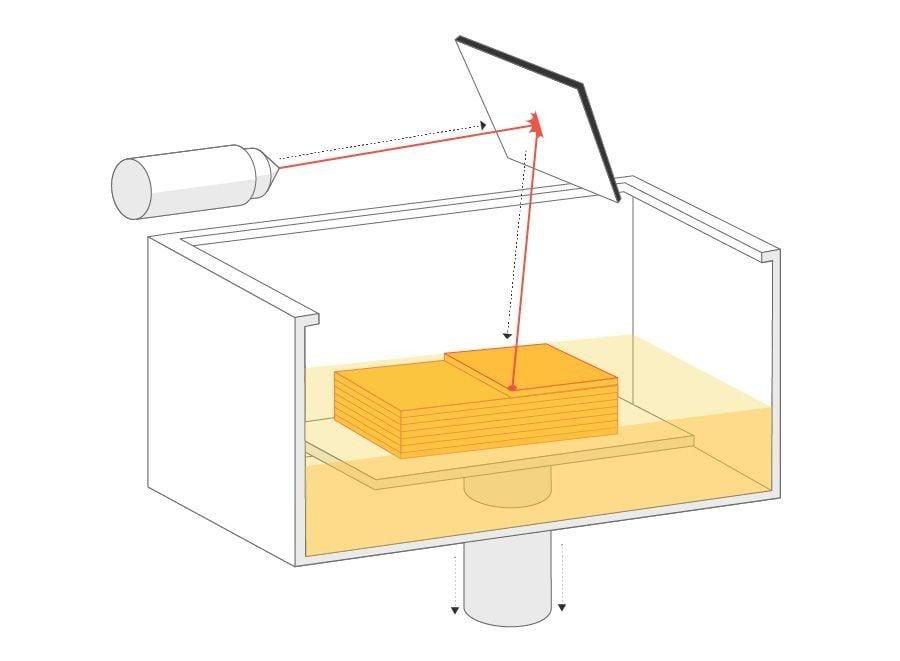
SLS sinters PA12 nylon powder with a laser, while MJF applies a fusing agent and then melts it with infrared energy, layer by layer. Both processes produce stronger interlayer bonding and better impact resistance than SLA resin. As a result, the minimum thickness runs slightly higher than SLA's white resin (0.5 mm) — typically 0.8 mm — but because the surrounding powder bed itself supports the part during printing, SLS/MJF doesn't show the same sharp thickness gap between supported and unsupported walls that SLA does.
Recommended minimum wall thickness by process and material
Creallo supports a range of 3D printing processes and materials beyond the SLA and ABS-like resin examples above. The table below shows how thickness requirements vary by material and process.
*You can find related specifications in Creallo's design guide.

Minimum wall thickness by process (with surrounding support)
| Process | Material | Wall thickness |
| SLA | White resin | 0.5 mm |
| Black resin | 0.7 mm | |
| Clear/translucent resin | 1.2 mm | |
| SLS/MJF | Nylon | 0.8 mm |
| SLM | All | 0.8 mm |
| FDM | PLA | 0.8 mm |
| TPU | 1.5 mm |
Minimum wall thickness by process (standalone, unsupported)
Minimum thickness requirements vary by material, even within the same process.
| Process | Material | Wall thickness |
| SLA | White resin | 1.0 mm |
| Black/brown resin | 1.0 mm | |
| Clear/translucent resin | 1.5 mm | |
| SLS/MJF | Nylon | 0.8 mm |
| SLM | All | 0.8 mm |
| FDM | PLA | 1.5 mm |
| TPU | 3.0 mm |
Adjusting thickness for larger models

Beyond process and material, part size is a factor you have to account for separately. Thin, wide geometries (rulers, masks, flat panels) are especially prone to shrinkage and warping. As a model gets larger, wall thickness needs to scale up with it to print reliably.
This principle applies to SLS as well as SLA. That said, the exact scaling isn't a fixed value per material or process — it also depends on the model's shape (flat panel vs. curved geometry, for example). The table below is a general baseline; your assigned PM may adjust it based on the actual geometry.
Recommended minimum wall thickness by model size
As part dimensions increase, wall thickness must increase accordingly to ensure dimensional stability.
| Process | Material | Model size | |||
| ~50 mm | 100 mm | 150 mm | 200 mm | ||
| SLA | White/black resin | 0.5 mm | 1.0 mm | 1.5 mm | 2.0 mm |
| Clear/translucent resin | 1.2 mm | 1.5 mm | 1.5 mm | 2.0 mm | |
| SLS/MJF | Nylon (PA12) | 1.0 mm | 1.5 mm | 2.0 mm | 3.0 mm |
| SLM | All materials | 0.8 mm | 1.5 mm | 2.0 mm | 3.0 mm |
FAQ
Q. My quote keeps coming back "not printable" — why?
A. Creallo's AI DFM review automatically analyzes every uploaded 3D model to determine printability. A "not printable" result can come from more than just insufficient thickness — build volume overruns and mesh errors (non-manifold geometry, holes in the mesh, etc.) can also trigger it. If thickness is the issue, use the process- and material-specific minimum thickness tables above to thicken the affected area and re-upload. If the issue persists even after meeting the thickness requirements, check for build volume or mesh errors. If you're still stuck, reach out to support@creallo.com.
Q. Can SLS/MJF parts be printed thinner than SLA?
A. No, it's the opposite. SLA's white resin has a 0.5mm minimum, while SLS/MJF nylon requires at least 0.8mm. That said, because SLS/MJF parts are built within a powder bed rather than relying on printed supports, they don't show the same large thickness gap between supported and unsupported walls that SLA does.
Q. I need a wall at 0.5mm — is there any way to make that work?
A. The right approach depends on the geometry and application, so send us your quote number and reach out to your account manager directly at support@creallo.com. We'll review the model and advise on feasibility and possible alternatives.
Getting thickness right at the design stage shortens your lead time
When a part comes back with a thickness-related revision request, it delays your production schedule. Accounting for minimum wall thickness at the design stage pays off in:
- Faster model review
- Fewer revision cycles
- Shorter lead times
- Lower cost
Creallo's AI-based model analysis checks 3D printing feasibility upfront, supporting fast, accurate 3D printing from prototyping through low-volume production.
Check your part's printability with Creallo's AI-based review system.
Related Content: